DESIGNER
HACKER
❯ draw circle
❯ draw arc
→ 2 strokes captured
❯ biwako-blue
→ retinted to #0044CC

Black Mirror Board

ブラックミラーボード

Where Designer's Intuition
meets Hacker's Command.

デザイナーの直感と、ハッカーのコマンドが
交差する場所。

launch
one file 一枚の HTML zero deps 依存ゼロ zero build ビルド不要 local-first ローカル完結
Section 01 — THE BOARD セクション 01 — ボード

Experience begins at the fingertip.

体験は、指先から始まる

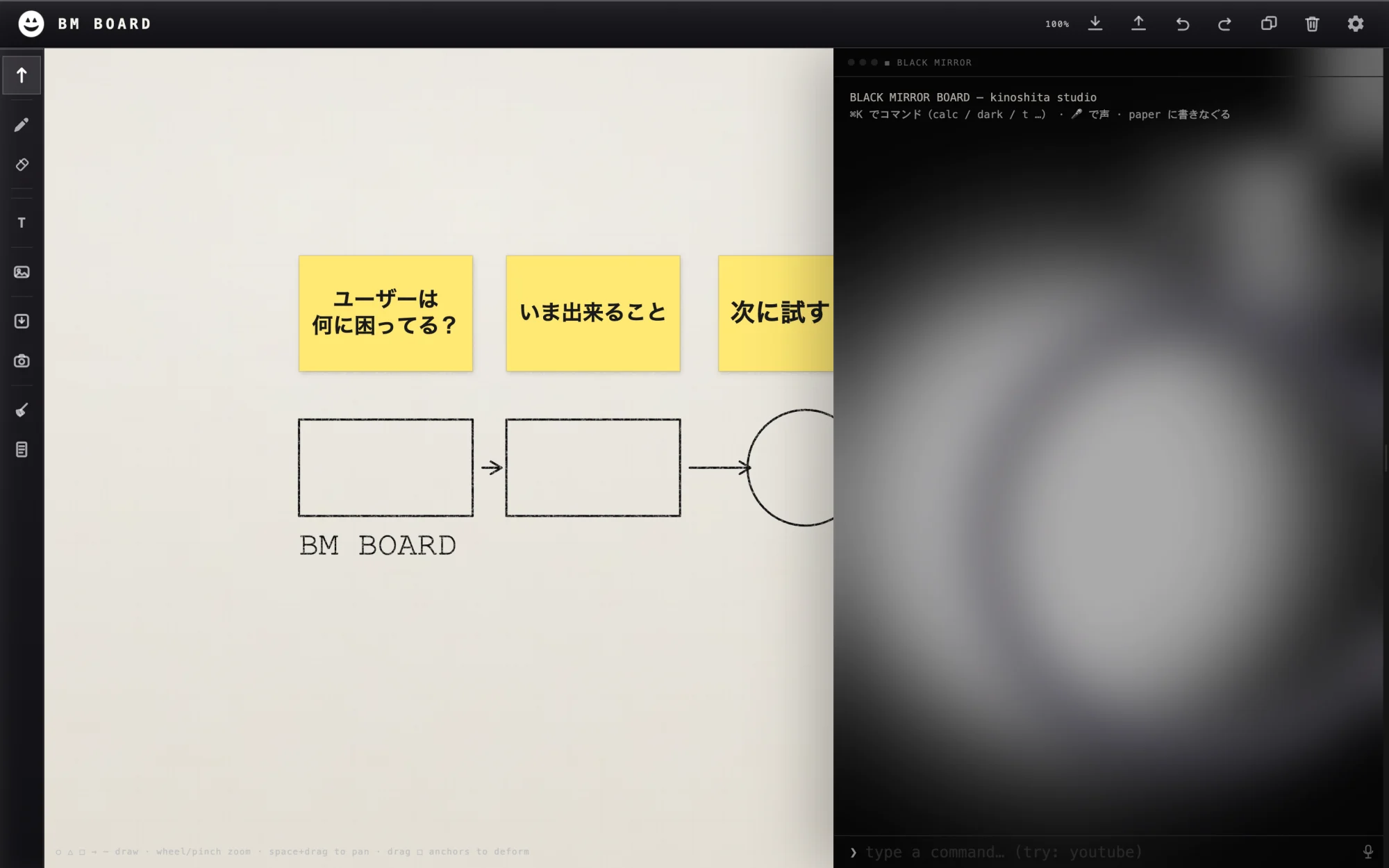
A pressure-sensitive pen engine. Strokes snap to close. Eight anchors bend every shape. Rotation feels like Illustrator — not a browser demo. Nothing stutters at 60fps.

Themes are a single word: dark, light, gray. Your file is yours — no account, no server, no upload.

Section 02 — THE TERMINAL セクション 02 — ターミナル

Magic travels as JSON.

魔法は JSON で流通する

Paste a JSON payload. A new spell installs. Type its name. Your canvas bends to its will. Spells live in IndexedDB — portable, remixable, yours.

Features are not bought. They are shared as spells.

An AI can write your next spell. Paste the BM API into Claude or ChatGPT, describe what you want, get back a JSON. The ecosystem grows one sentence at a time.

Section 03 — DUAL PERSPECTIVE セクション 03 — 二律背反

Two minds. One board.

二つの知性、一枚の板。

Designerデザイナー

  • Pen, ink, pressure — the hand leads
  • 鉛筆、インク、筆圧 — 手が導く
  • Biwako silence as the default palette
  • 琵琶湖の静寂が、既定のパレット
  • Every shape edits like a native vector
  • すべての図形が、ベクター然として編まれる
  • Export PNG in one keystroke · SVG in one word
  • PNG は 1 キーで、SVG は 1 語で書き出せる

Hackerハッカー

  • Terminal, JSON, spells — the mind commands
  • ターミナル、JSON、呪文 — 知性が命じる
  • Register a spell in one line of JS
  • 1 行の JS で、新しい呪文を登録できる
  • Paste from SNS, drop a .json, bundle everything
  • SNS から拾い、ファイルで配り、まとめて運ぶ
  • IndexedDB persistence · offline · forever yours
  • IndexedDB に刻まれ、オフラインで生き続ける
Section 04 — CAPABILITIES セクション 04 — できること

Six doors into the mirror.

鏡に開かれた、6つの扉

▸ SVG EXPORT

SVG EXPORT Pencil strokes become editable vectors 鉛筆の線が、そのまま編集可能なベクターに

Draw with the pen. Type svg. Drop the file into Figma or Illustrator and keep editing — beziers, anchors, strokes all intact.

鉛筆で描いて、svg と唱える。書き出した SVG を Figma / Illustrator に放り込めば、曲線・アンカー・線幅すべてそのまま編集できる。

$ svg
▸ TRANSPARENT PNG

TRANSPARENT PNG Ship objects with a clean alpha channel 背景透過のままオブジェクトを書き出し

Select one or many shapes, hit png, get a pixel-crisp raster with full transparency — drop it into Keynote, Notion, a deck, a Discord post.

形を選んで png と唱えれば、アルファチャンネル付きの高精細 PNG に。Keynote でも Notion でもスライドでも、そのまま置ける。

$ png
▸ IMAGE BRAINSTORM

IMAGE BRAINSTORM Keywords → scatter of images. Thoughts, non-stop. キーワードでイメージが散る。思考、ノンストップ。

Type a word. Images of it appear on the board — spread, rotated, ready to annotate. The canvas becomes a mood-board that writes itself.

一語を投げれば、イメージがボード上に散らばる。回転、余白、注釈。キャンバスが、勝手にムードボードになる。

$ fetch-img <keyword>
▸ CUSTOM SPELLS

CUSTOM SPELLS Author your own magic. Yours forever. 自分だけの魔法を、自分だけに

Write one line of JS or paste JSON — your command is registered, auto-completed, persisted. Describe what you want to Claude or ChatGPT and get a spell back instantly.

1 行の JS を書く。あるいは JSON を貼るだけ。呪文は登録され、補完され、IndexedDB に残る。Claude や ChatGPT に自然言語で依頼すれば、動く JSON が返ってくる。

$ register · paste JSON
▸ SHARE · SNS

SHARE / SNS A spell is a text string. Text travels. 魔法は一片のテキスト。いくらでも、どこにでも

Export any spell as JSON — drop it into X, Slack, a gist, or your friend's DM. They paste, it installs. Features spread like memes.

呪文は JSON 1枚。X に貼る、Slack に貼る、gist にしてもいい。受け取った人は貼るだけで自分のボードに魔法が住み着く。機能はミームのように広がる。

$ export · $ paste
▸ CAMERA / LIVE

CAMERA / YouTube LIVE The mirror can look back. 鏡は、こちらも覗き返す

Type Black Mirror. A draggable webcam wipe appears — selfie-mirrored, CRT-tinted. Flip a switch and the canvas streams straight to YouTube. Casual, personal, live.

Black Mirror と唱えれば、カメラのワイプがふわっと現れる。ドラッグで自由に置ける。スイッチ一つで、キャンバスはそのまま YouTube ライブへ。気楽で、個人的で、生。

$ Black Mirror · $ live
Section 05 — FOR DESIGNERS セクション 05 — つくる手のために

Six more tools, for hands that ship.

作って届ける手のための、もう6つの道具。

▸ FRAME TEMPLATES

FRAME TEMPLATES Pick a paper. Draw inside. Export the clip. 入稿サイズで作って、フレームの中だけ書き出し

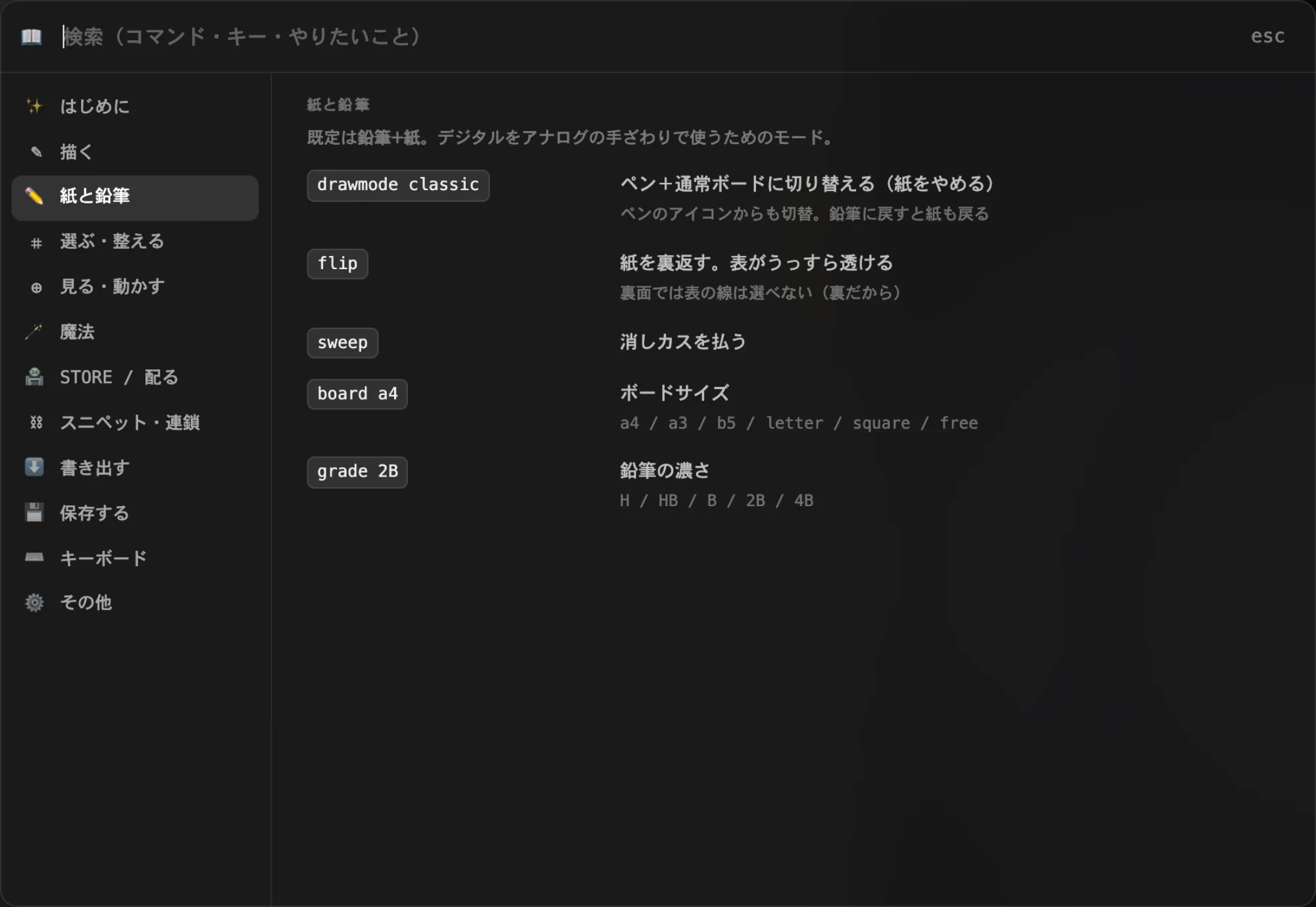
A4 / B5 / postcard / square / 16:9 — call frame, pick a size, draw inside the placed frame, then X to clip-export. Print-ready PNG without leaving the canvas.

A4 / B5 / ハガキ / 正方形 / 16:9 — frame でサイズピッカー、フレーム内だけ描いて X でクリップ書き出し。入稿サイズの PNG が、キャンバス内で完結する。

$ frame
▸ PPTX EXPORT

PPTX EXPORT Open it in Keynote. Keep editing. Keynote / PowerPoint で開いて編集続行可

Compose a deck on the canvas. Type export pptx. Open in Keynote or PowerPoint — text, shapes, layout all editable. No raster bake, no rebuilding from screenshot.

キャンバスでスライドを組んで export pptx。Keynote / PowerPoint で開けば、テキストも図形もレイアウトもすべて編集可能。スクショから組み直す摩擦がゼロ。

$ export pptx
▸ JAPANESE TYPE

JAPANESE TYPE Vertical writing. Ten fonts. Bold + bullets. One word each. 縦書き、10種フォント、太字、箇条書き — すべて一語

Vertical text via vertical. Switch typeface in one word: font mincho · gothic · yugo · hand · mono — ten Japanese-aware fonts. Bold and bullets (- · * · 1.) work on any sticky.

縦書きは vertical 一語。フォント切替も一語: font mincho · gothic · yugo · hand · mono — 日本語対応 10種。boldbullet -/*/1 はどの付箋にも効く。

$ vertical · $ font · $ bold · $ bullet
▸ 8-ANCHOR EDITING

8-ANCHOR EDITING Drag any of 8 handles. Rotate from the top. 8つの取っ手で変形、上から回転

Select any shape — 8 anchors appear (4 corners + 4 mid-edges) plus a rotation handle. Scale, skew, deform, rotate — like Illustrator's transform, in-place on the canvas.

図形を選ぶと 8 つのアンカー(4 隅 + 4 辺中央)と回転ハンドルが現れる。拡大、シア、変形、回転 — Illustrator の transform をその場で。

select · drag · rotate
▸ GIF / MOTION EXPORT

GIF / MOTION EXPORT N images become one looped GIF. 複数枚の画像から、1つのループ GIF

Built-in GIF encoder (gifenc). Select multiple images — frames, sketches, fetched stills — and pack them into a looped animation. Local-only, no upload, no service.

GIF エンコーダ(gifenc)を内蔵。複数の画像を選んで一発でループ GIF に。フレーム、スケッチ、fetch した素材も同列に扱える。サーバ不要、外部サービス不要。

via BMBrowser · Available
▸ NO LAYERS · BY DESIGN

NO LAYERS · BY DESIGN One surface. No layer panel. レイヤー無しの潔さ — 一面で考える

Other tools give you layers. We took them out. Z-order without panels, selection without filters — every object lives on the same surface, where ideas live too. The cognitive overhead is the feature we removed.

レイヤー機能はあえて入れていない。z 順は触れる、選択はそのまま、すべてのオブジェクトが同じ一面に住む。アイディアと道具のあいだに「レイヤーパネル」を挟まない。引いたものが、機能。

— intentional simplicity
Section 06 — TRY A COMMAND セクション 06 — コマンドを試す

The mirror is already listening.

鏡は、すでに聞いている

// BM splash shell · type a command, press Enter. // BM スプラッシュシェル · コマンドを打って Enter。
// try: launch · about · help · clear // 試す: launch · about · help · clear
launch → enter the board  ·  about → philosophy  ·  help → all commands
launch → ボードへ遷移  ·  about → 哲学  ·  help → 全コマンド
Section 07 — ALSO ON THE DESK セクション 07 — もうひとつの道具

The board, beside any page.

どのページの横にも、黒板を。

Black Mirror Browser is a Chrome extension. It brings BMBoard into the browser as a side panel — opened with the toolbar icon or ⌘⇧Y. Right-click an image or selected text on any page — "Send to BMBoard" drops it directly onto the side panel.

Black Mirror Browser は Chrome 拡張機能。BMBoard をサイドパネルとして持ち込み、ツールバーのアイコン(または ⌘⇧Y)でいつでも黒板を開ける。画像やテキストの右クリックメニューから「Send to BMBoard」でサイドパネルに送る。

⌘⇧Y
open BMBoard side panel from any page
right-click image
send to BMBoard canvas
right-click text
send as sticky note
drag image → panel
drop any web image onto the board
paste text on canvas
lands as a sticky note
right-click sticky
colour palette · font · bold
right-click 1 image
crop / trim (non-destructive)
right-click 2+ images
make animated GIF
selection size
W × H px shown in panel bar
⌘⇧Y
どのページからでもサイドパネルを開く
画像を右クリック
キャンバスに送る
テキストを右クリック
付箋として送る
画像を D&D → パネル
ウェブ画像をそのままキャンバスへ
キャンバスにペースト
テキストが付箋になる
付箋を右クリック
カラー変更・フォント・Bold
画像1枚を右クリック
クロップ / トリム(非破壊)
画像2枚以上を右クリック
GIF アニメを作成
選択サイズ表示
W × H px をパネルバーに表示

No account. No analytics. No tracking. Same hands, same desk — one more surface.

アカウントなし。アナリティクスなし。トラッキングなし。同じ手、同じ机 — もう一面だけ広く。

+ Add to Chrome — Free + Chrome に追加 — 無料 Chrome Web Store
v1.1.3 · Chrome, Brave, Edge · Privacy v1.1.3 · Chrome / Brave / Edge 対応 · プライバシー
Section 08 — THE MAKER セクション 08 — 作った人
木下 貴博 — kinoshita studio / 琵琶湖のほとりで

Built by one person,
beside Lake Biwa.

琵琶湖のほとりで、
ひとりで作った。

Netflix was on. I was watching Black Mirror.
Then it hit me — why don't designers and engineers ever share the same canvas?

One has intuition. The other has commands.
Both are trying to build something.
Black Mirror Board is the place where they finally meet.

ある夜、Netflixで「ブラックミラー」を見ていた。
そのとき気づいた —— デザイナーとエンジニアが同じキャンバスを見る場所が、この世にない。

一方には直感がある。もう一方にはコマンドがある。
ふたりは同じものを作ろうとしている。
Black Mirror Board は、その交差点だ。

Takahiro Kinoshita / 木下 貴博

Designer & Developer — 木下スタジオ / kinoshita studio · Shiga, Japan

Read the full story →開発ストーリーを読む → kinoshita.studio / 木下 貴博 →